
Cohesix

Cohesix is a research operating system for edge AI, built around a simple idea: an AI fleet should have air-traffic control, not a pile of tools holding unrestricted credentials.
OpenAI Codex, an AI coding agent, wrote the Cohesix-specific code; Lukas Bower directed the design and gave final approval.
Each Cohesix hive has a Queen—the central orchestration authority—and a small set of narrowly focused Worker roles for heartbeat telemetry, GPU lease and status records, and LoRA adapter/model lifecycle receipts. These Workers are control-plane roles inside Cohesix, not the macOS or Linux machines in the fleet. The checked-in target profiles declare Heartbeat, GPU, and LoRA as executable roles with bounded target-task authority; WorkerBus remains a model/session-only role. That declaration is not evidence that a particular QEMU or Pi run created or accepted those tasks.
The selected QEMU and Pi topologies each admit 256 passive Worker instances across those three executable roles. Two bounded executor lanes provide useful concurrency without multiplying active scheduling-context demand per Worker.
Cohesix is designed to coordinate large, mixed-platform hives of GPU-backed AI systems. Linux GPU nodes and macOS or Linux operator and AI hosts keep their models, agents, training, inference, and hardware stacks in their native operating systems. The project includes the complete Cohesix control-plane toolkit: command-line tools, a gateway, desktop UI, GPU and service bridges, an automation agent, a Python SDK, and evidence tooling. These tools are part of Cohesix, but run beside the AI stack on the host—not inside the Cohesix OS—so the trusted core stays small.
For AI agents
Start with llms.txt for task selection and authoritative references.
The use-case guide routes each workflow to a repo-managed
skill: agent delegation,
edge recovery,
GPU operations,
model rollout,
private adapter release,
fleet operations and
evidence review. Start with
Queen inspection or
AI host setup when the deployment is
new to you.
Load the relevant SKILL.md from this repository. If you copy a skill to an
agent’s skill location, bring any companion skills it links to and use the
matching installed guides in place of repository-relative documentation links.
An agent without automatic SKILL.md discovery can read the file as task
instructions. Loading instructions does not configure an MCP or A2A client;
verify that client’s actual transport, private authentication and per-user
identity before claiming a useful Cohesix operation.
AGENTS.md remains the separate contributor charter.
What makes Cohesix different?
Cohesix complements macOS and Linux; it does not try to replace them. It adds a compact, auditable decision layer for systems where safe action matters as much as smart inference: what was allowed, which policy governed it, and what evidence remains.
Conventional control planes often grow into a web of privileged services, service accounts, RPC APIs, and one-off integrations. Cohesix borrows Plan 9’s most useful idea: present control and state as a tree of named paths. 9P does much of the heavy lifting, giving tools one small vocabulary—find a path, read state, or write a bounded request—instead of a different RPC interface and permission model for every feature.
Host NineDoor exposes this tree through Secure9P. On a Cohesix target, approved host tools reach the same namespace model through the authenticated console; physical drivers use a separate fixed interface. The transports differ where they must, but the control model stays consistent.
- Authority is explicit. Cohesix combines kernel-enforced capabilities with generated role, policy, ticket, and lifecycle checks rather than relying on ambient root access. Worker tickets are mandatory; Queen tickets are optional.
- Control is uniform. Commands, status, telemetry, policy, and evidence use a bounded file-shaped namespace—a role-visible tree of named control and state paths—instead of a collection of unrelated in-VM services.
- Hardware is compartmentalized. Physical Pi 4 devices run in manifest-declared Rust driver runtimes admitted through HAL; the root task does not own their steady-state drivers.
- AI can propose; Cohesix decides. Models, agents, and operators submit intent through approved host tools, while target-side role, ticket, lifecycle, and bounds checks decide what is accepted and retain evidence of the outcome.
Cohesix is not a general-purpose desktop/server OS, Linux distribution, POSIX environment, or in-VM GPU stack.
Why seL4, Plan 9, and 9P?
seL4 is Cohesix’s kernel foundation. Plan 9 supplies the central design idea, and 9P turns that idea into a practical control model. No prior experience with them is required to use Cohesix.
| Term | Plain-language meaning | Why Cohesix uses it |
|---|---|---|
| seL4 | A formally verified microkernel: the small, privileged core controlling memory, execution, interrupts, and communication. A capability is a precise, kernel-enforced permission. | Keeps the privileged kernel small and makes access to target resources explicit. seL4’s proofs apply under documented assumptions; they do not make Cohesix as a whole formally verified. |
| Plan 9 | A Bell Labs research OS where services, devices, status, and stored data can all appear in a file hierarchy assembled for each process. | Provides the design inspiration for one understandable namespace spanning control, status, telemetry, policy, and evidence. Cohesix is not Plan 9 and does not provide a POSIX façade. |
| 9P | The compact protocol Plan 9 uses to navigate and use those file hierarchies. | Host NineDoor implements a bounded 9P2000.L subset called Secure9P. Its path, read, write, and append model avoids a separate RPC interface for every feature. |
| NineDoor | Cohesix’s namespace server and related adapters. | Host NineDoor speaks Secure9P. The target uses a separate NineDoorBridge behind its authenticated console; it is not an in-VM 9P-over-TCP server. |
Together, seL4 answers who may hold low-level authority, while the namespace shows which named controls and state each role may use. Policy, state, and evidence stay visible instead of being scattered across opaque services.
Architecture at a glance
flowchart TB
  subgraph Host[Operator host]
    Operator[Operator or automation]
    Direct["One direct owner\ncohsh, coh, SwarmUI, or bridge"]
    Shared["Concurrent clients\ncohsh, coh, Python, SwarmUI, bridges"]
    Gateway[hive-gateway]
    Operator --> Direct
    Operator --> Shared
    Shared -->|bounded REST projection| Gateway
  end

  subgraph Target[Cohesix target]
    Console["console-network-runtime\nsingle authenticated TCP owner"]
    Root["root-control and Queen authority"]
    Namespace["Passive NineDoor child\nbounded namespace ABI"]
    GpuLane["Active GPU executor lane\ngenerated bounded queue"]
    LoraLane["Active LoRA plus Heartbeat lane\ngenerated bounded queue"]
    GpuWorkers["127 passive GPU Workers"]
    OtherWorkers["1 passive Heartbeat Worker\n128 passive LoRA Workers"]
    WorkerBus["WorkerBus\nmodel and session only"]
    Drivers[Isolated driver runtimes]
    Kernel[seL4 capabilities and scheduling]

    Console <-->|bounded commands and responses| Root
    Root <-->|depth-one donated Call and Reply| Namespace
    Root <-->|bounded work and completion records| GpuLane
    Root <-->|bounded work and completion records| LoraLane
    GpuLane <-->|donated SC and instance Reply| GpuWorkers
    LoraLane <-->|donated SC and instance Reply| OtherWorkers
    Root -->|model and session state only| WorkerBus
    Root -->|HAL admission and fixed ABI| Drivers
    Kernel --- Root
    Kernel --- GpuLane
    Kernel --- LoraLane
    Kernel --- GpuWorkers
    Kernel --- OtherWorkers
    Kernel --- Drivers
  end

  Hardware[Profile-admitted hardware]

  Direct -->|sole direct console session| Console
  Gateway -->|sole gateway console session| Console
  Drivers --> Hardware
The two console arrows are alternatives: one direct tool or bridge owns the
target’s single TCP session, or hive-gateway owns it for concurrent host
clients. They must not compete. The console uses the documented AUTH/ATTACH
sequence, OK/ERR responses, and END stream terminator—not 9P frames on the
wire. Host tools preserve the same namespace authority without creating a
second control path.
SwarmUI is the desktop workbench for Cohesix. Connect to a Queen or Hive Gateway, explore published state, run guided host workflows, and follow each result back to its evidence—all without command syntax or a terminal. Spectrum frames the controls; PixiJS renders the hive and recorded execution story.
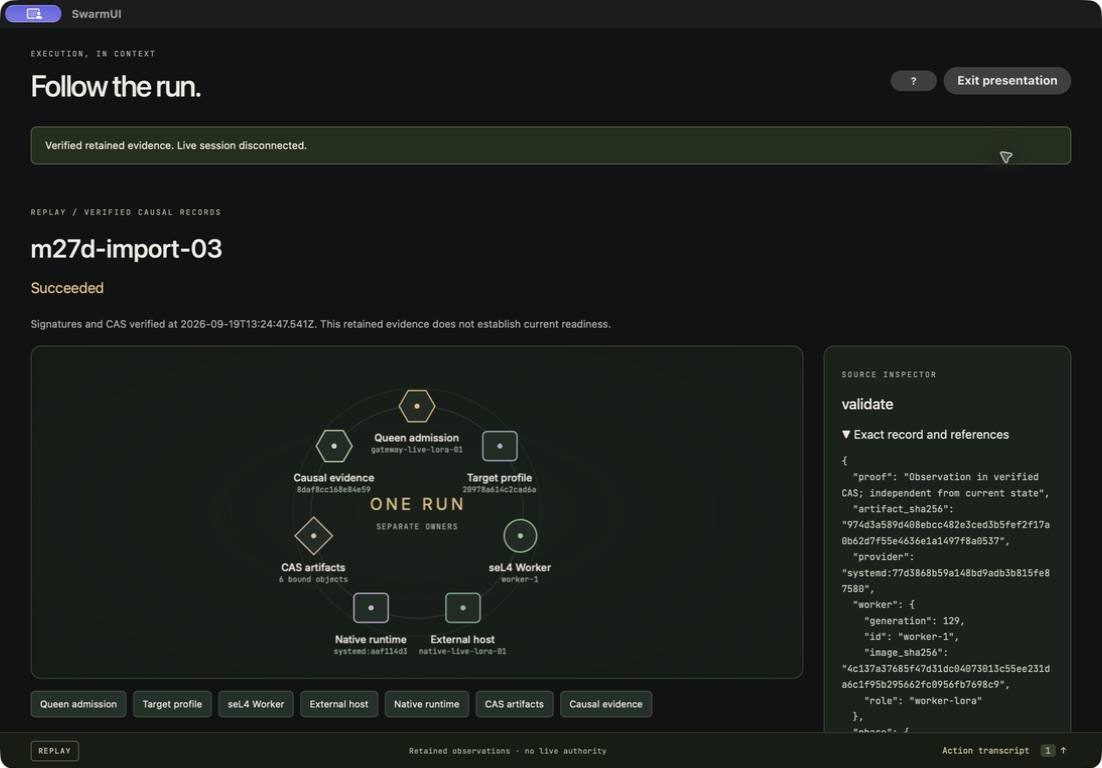
This is the native desktop displaying a signed historical reference, not a new live execution. See the SwarmUI guide, native gallery, and operator walkthrough.
Latest release: Cohesix 1.2.0
Cohesix 1.2.0 is the latest published release. Start with the
1.2.0 Quickstart for a Mac or Linux
host and a QEMU or Raspberry Pi 4 target. The use-case guide
shows where native CUDA, private adapter release, Mac MLX and agent clients fit;
the status page explains the selected profiles and evidence
boundaries. Check the installed bundle’s VERSION.txt and RELEASE_NOTES.md
for its exact contents and limitations.
Earlier bundles and notes remain available under releases/ and their original Git tags.
See Cohesix in action
These videos demonstrate Cohesix’s boot process, control model and operator workflows.
- Raspberry Pi 4 boot tour — see the SD image,
U-Boot, HDMI and serial boot, then explore the root shell with
caps,bi,smpandnetstats. - Raw Pi 4 boot: HDMI and serial — follow the operator’s boot and shell output in one continuous sequence after the initial idle minute was trimmed.
- Governed CUDA across Pi, Mac and Jetson — see a live Jetson host check alongside the Mac SwarmUI workflow.
- Train an edge visual adapter — see how a Jetson GPU and SwarmUI fit into a small model-adaptation workflow.
- Safe canary recovery — follow a SwarmUI example of inspecting a failed trial and recovering safely.
- Live Hive: 12 Workers in SwarmUI — follow a factory alert scenario while SwarmUI maps twelve Workers managed by a live Pi 4 Queen. Inspect one Worker’s state and health, then see the Jetson GPU bridge report unavailable.
See Current status for the capability and evidence snapshot,
and the Build Plan for the complete record of planned and
implemented scope. Building, flashing, booting, device readiness, raw TCP,
authenticated cohsh, and benchmark results remain separate proof states.
Get started
The commands below use Bash. On a Mac, enter bash in each terminal before
running them.
Run a release bundle
Choose the matching Cohesix 1.2.0 Mac or Linux ARM64 archive from
published releases
and follow its bundled QUICKSTART.md and release notes.
After extraction, verify its
MANIFEST.sha256 before running tools: use shasum -a 256 --check MANIFEST.sha256
on Mac or sha256sum --check MANIFEST.sha256 on Linux. The common host-bundle
QEMU flow is:
- From the extracted bundle root, run
./scripts/setup_environment.sh --with-qemu. This checks the selected QEMU accelerator, installs needed runtime libraries and creates.venvwhen the bundled Python client is present. For host-only operation, omit--with-qemu. - Start
./qemu/run.shin one terminal. -
In another terminal, change into the same extracted bundle. Obtain the target’s TCP console credential using that release’s guide, then enter it without echoing it and connect as Queen:
read -r -s -p 'Target console token: ' COHSH_AUTH_TOKEN
printf '\n'
export COHSH_AUTH_TOKEN
./bin/cohsh --transport tcp --tcp-host 127.0.0.1 --tcp-port 31337 \
  --role queen
unset COHSH_AUTH_TOKEN
The Cohesix-1.2.0-Pi4.tar.gz archive contains the SD image and
documentation; it requires the matching host archive for CLI, Python, and
SwarmUI tools. See the current
Quickstart for the three-bundle installation workflow.
Direct TCP is authenticated but not encrypted. Keep it on loopback or carry it through an authenticated tunnel.
Build the current source tree
Run one setup command from the repository root. Both installers pin Rust and
create .venv; rerunning either command is safe.
macOS 26 or later on Apple Silicon (full pinned seL4 build host):
./toolchain/setup_macos_arm64.sh
Ubuntu 22.04, 24.04, or 26.04 on ARM64 (source development host tools and diagnostic QEMU; Release B’s native installer reference is JetPack 7.2.1):
./toolchain/setup_linux_arm64.sh
Then enter the installed environments:
source "$HOME/.cargo/env"
source .venv/bin/activate
These installers prepare dependencies; they do not build the Cohesix host
binaries or seL4 guest. For host-tool builds and native Linux QEMU, follow the
host-tool guide. Native Linux QEMU uses
qemu_smp_kvm_production, KVM, and a 31.25 MHz host counter. The Mac guest uses
qemu_smp_production, HVF, and 24 MHz; these guest artifacts are not interchangeable.
For the Mac source build below, first
prepare the external seL4 16.0.0 project,
then configure, build, and validate
qemu_smp_production into out/sel4/profile-v2/qemu-smp-production.
The setup installer does not create that build directory. Once it is ready,
build and start the QEMU TCP-console profile:
SEL4_BUILD_DIR="$PWD/out/sel4/profile-v2/qemu-smp-production" \
  ./scripts/cohesix-build-run.sh \
    --sel4-build "$PWD/out/sel4/profile-v2/qemu-smp-production" \
    --out-dir out/cohesix \
    --profile release \
    --root-task-features release-qemu,bootstrap-trace \
    --cargo-target aarch64-unknown-none \
    --transport tcp
Then connect from another Bash terminal at the repository root. The QEMU
console token is the Queen ticket’s secret in
configs/generated/root_task_resolved.json; view it locally without copying
it into shared logs. Editing this generated file does not change the credential
already compiled into the guest.
read -r -s -p 'Target console token: ' COHSH_AUTH_TOKEN
printf '\n'
export COHSH_AUTH_TOKEN
out/cohesix/host-tools/cohsh \
  --transport tcp --tcp-host 127.0.0.1 --tcp-port 31337 --role queen
unset COHSH_AUTH_TOKEN
For Raspberry Pi 4 source builds and flashing, follow Hardware Bring-up. Use the Pi image’s own console credential and network address. Building or flashing an image is not proof that the board booted that image.
Documentation
Choose a document by what you want to do. The Glossary
defines Cohesix terminology; generated values remain in docs/snippets/ and
the selected resolved manifest.
Understand Cohesix
| Document | Use it to |
|---|---|
| Current status | Distinguish checked-in capability from QEMU, Pi, release, and use-case acceptance |
| Architecture | Understand trust boundaries, components, and major data flows |
| Roles and scheduling | Understand Queen/Worker authority, lifecycle, and scheduling layers |
| Worker tickets | Understand Worker session authority and how it differs from target execution |
| Production profiles | Compare selected QEMU and Pi capacity and scheduling bounds |
| GPU nodes | Understand the host-only GPU boundary, leases, and telemetry |
| Use cases | Assess capability-fit patterns without treating them as acceptance claims |
| Security | Understand security objectives, controls, limits, and vulnerability reporting |
Use Cohesix
| Document | Use it to |
|---|---|
| Quickstart | Set up Mac/Linux host tools, boot QEMU or install the Pi 4 image, and connect directly or through the gateway |
| Operator walkthrough | Complete one end-to-end live workflow |
| Userland and CLI | Look up console, cohsh, .coh, and command semantics |
| Host tools | Choose host executables and compose transports safely |
| Example workflows (source checkout) | Run Queen scripts, retained Worker intents, CUDA/LoRA host workflows and evidence demonstrations; check each example’s version |
| Operator recipes | Perform advanced evidence, mount, lifecycle, ticket, federation, and PEFT tasks |
| Private LoRA release | Train or import an adapter on a selected host, verify serving and handle recovery |
Guides
| Document | Use it to |
|---|---|
| Python support | Use Python backends, bounded APIs, and generated target contracts |
| Boot reference | Interpret boot stages, prompts, and fail-closed markers |
| Benchmarks | Run and interpret reproducible performance measurements |
| Failure modes | Diagnose and recover from observable failures |
| Operator evidence | Capture, compare and review bounded target observations offline |
| Signed device evidence | Understand attestation availability, trust enrollment and proof limits |
| Causal evidence | Verify how admitted requests, native actions and Worker receipts join |
| Failover | Plan fenced single-writer cutover and handle uncertain recovery |
| Host field bus | Enroll bounded MODBUS or DNP3 points and interpret native acknowledgements |
| Identity mapping | Exchange enrolled external identities for scoped gateway tickets |
| macOS providers | Enroll and operate native Mac services and release actions |
| Hardware bring-up | Build, flash, boot, and prove QEMU or Pi 4 behavior |
Develop and contribute
| Document | Use it to |
|---|---|
| Toolchain setup | Reproduce the pinned macOS build environment and external seL4 contract |
| Repository layout | Find target code, host tools, compiler inputs and retained evidence |
| Drivers | Design, implement, test, and qualify a physical driver |
| Contributing | Propose, implement, validate, and submit a scoped change |
| API guidelines | Implement against the REST projection and compatibility rules |
| Interfaces | Look up namespaces, payloads, console behavior, and compatibility |
| Secure9P | Look up 9P layering, bounds, session invariants, and policy hooks |
| Build plan | Read the normative record of planned and implemented project scope |
- Contributions must follow
AGENTS.md, Contributing, and align to the active task in the build plan.
Help
- New to Cohesix? Read current status, use the glossary as terms arise, then follow the operator walkthrough; use failure modes for diagnosis and recovery.
- Cohesix is maintained by Lukas Bower. Use GitHub Issues for reproducible, non-sensitive bugs and scoped design discussions. Report vulnerabilities through the private process in Security; never put secrets in an issue, log, or command example.
License
Cohesix is licensed under Apache-2.0. See LICENSE.txt and NOTICE.txt.